EN|中文

How DirectLink Works

DirectLink is a signaling-assisted peer-to-peer platform. It coordinates login, authorization, server registration, discovery, and connection setup; application data flows directly between endpoints over encrypted channels.

The platform has a hosted coordination service plus endpoint software that runs on customer machines. The same DirectLink foundation supports two product pairs: general private services through MTCode Server and Portal, and managed GPU clusters through MTGPU Server and the Remote-GPU extension.

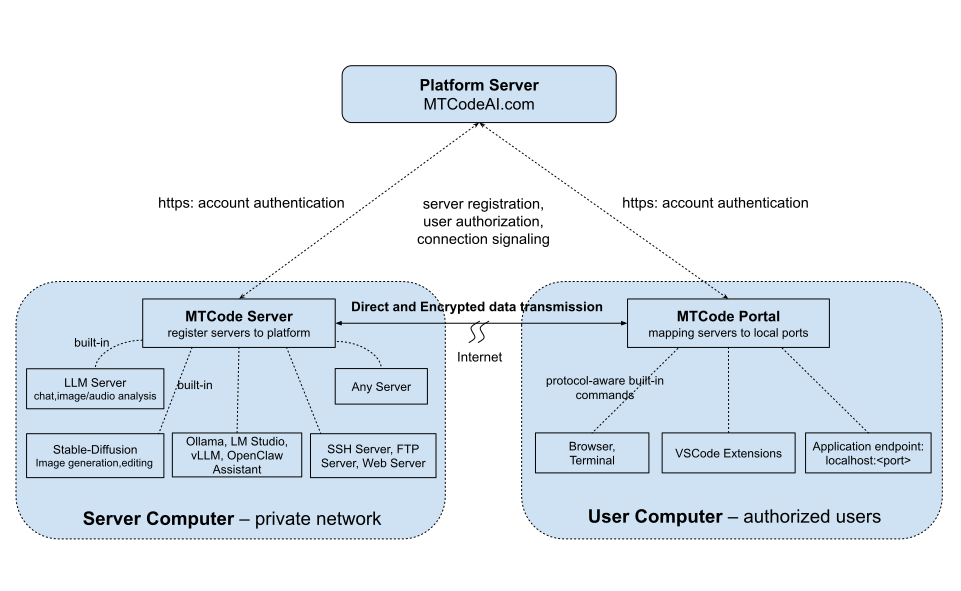
MTCode DirectLink Architecture Diagram

DirectLink coordinates identity and connection setup; endpoint traffic is encrypted and direct whenever possible.

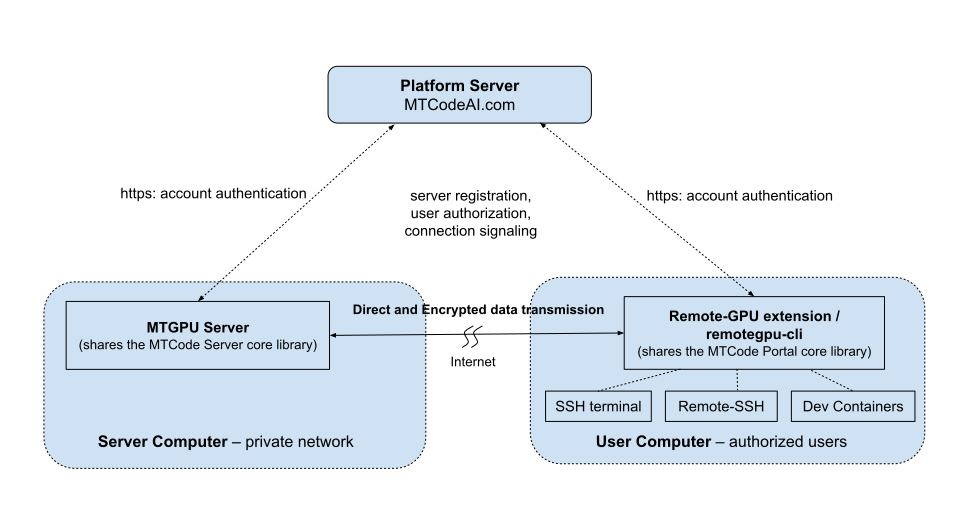
Note: Click to view the MTGPU diagram, which is built on DirectLink.

Platform Roles

Platform Server

Hosted by MTCodeAI.com for authentication, authorization, registration, service discovery, and connection signaling. It does not relay application data.

Service endpoints

MTCode Server registers ordinary TCP services. MTGPU Server registers managed GPU hosts and dedicated SSH endpoints.

User endpoints

MTCode Portal maps authorized services to local ports. The Remote-GPU extension opens SSH terminals, Remote-SSH, Dev Containers, and container workspaces with job submission.

Connection Model

When a user signs in, the client retrieves only the services or GPU hosts that user is authorized to access. When the user connects, DirectLink signaling helps both endpoints establish a direct peer-to-peer path through NAT where possible. The endpoint protocol remains encrypted end to end.

When a Direct Path Isn't Available

DirectLink connects successfully for the great majority of users. To push the success rate as high as possible, DirectLink applies a multi-layered NAT-traversal strategy that adapts to different network configurations — it can establish direct connections even through many symmetric-NAT routers. Even so, some restrictive environments — typically a strict corporate firewall combined with certain types of symmetric NAT — can still block a direct connection. In those cases a connection may not be established; an administrator can set up a lightweight relay server, as described below.

Check your own network: Download the MTCode Portal program and try connecting to our public demo service, following the steps in demo.html. The demo server runs inside a private network behind NAT, with no public inbound ports and no firewall exceptions — if your connection succeeds, DirectLink works on your network.

Hosting Your Own Relay Server

For those rare networks where a direct path cannot be established, you can add your own fallback. An administrator downloads and runs mtcode-relay under their account, and it becomes an optional relay for every server and client on that same account.

Whenever a server and a client cannot reach each other directly, DirectLink automatically routes that connection through your relay — with no configuration or action from users. Direct connections are always preferred and used whenever possible; the relay steps in only when a direct path fails, and the whole handoff is completely transparent to users.

The relay is lightweight and easy to host. Run it on a VPS with a public IP, or inside your own private network behind a NAT router — all it needs is a single inbound port opened on the router and in the firewall.

Secure End-to-End Encryption

Every connection between a server and its clients is protected by TLS encryption. When a server registers with the platform, it generates its own certificate and private key locally, on the server’s computer. The private key is created there and stays there — it is never uploaded, transmitted, or stored anywhere else.

Because no one else ever holds the key — not other users, not network operators, and not even the MTCode platform — no third party can decrypt the traffic between your clients and your servers. Encryption is truly end to end: your data can be read only at the two endpoints you control.

This protection holds even when a connection is routed through a relay. A relay forwards only the already-encrypted stream — it holds no private key and cannot read a single byte of your data. Whether your traffic travels directly or through a relay you host, it can be decrypted only at the two endpoints you control.

What this means for you: your application data stays private even from us. The private key that protects a server’s connections exists only on that server — and never on any relay in between.

How Is It Different from Tunnels and VPNs?

Reverse-proxy and tunneling tools such as ngrok and Cloudflare Tunnel route traffic through an intermediate relay server. That extra hop can add latency, limit throughput, create bandwidth costs, and put a third-party provider in the traffic path.

Mesh VPNs such as Tailscale connect entire devices into a private overlay network — but a reachable network is not the same as visible services. Nothing lists what is available: each user must already know which machine hosts a service and connect with the right address and port. And when you want to share only specific services — not the entire computer — across multiple administrators, careful access-control configuration and coordination are often required.

With MTCode DirectLink, users need one app — MTCode Portal — and one account. Authorized services from every administrator appear automatically in one interface, ready to use without network configuration. Access is granted to individual services, not entire computers.

Ready to try it?

Start with the product that matches your need: a managed GPU development host, or a private service published through DirectLink.

Explore MTGPUExplore MTCode Server
MTGPU Server Architecture Diagram